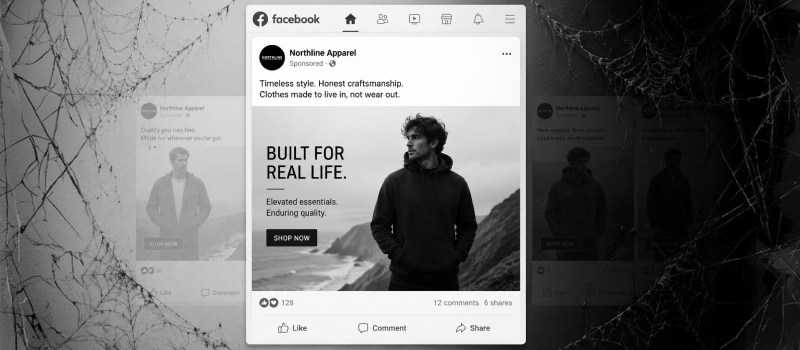

Google's latest combo, Gemini 3 Pro and Nano Banana Pro, is pretty remarkable when you think about what they can do together. It's like having a brilliant strategist paired with a skilled illustrator, both working from the same playbook. If you've ever felt like AI image generation is a bit of a lottery, this pairing might change your mind.
What Makes Gemini 3 Pro Different
Gemini 3 Pro is Google's newest flagship model, and it's built to actually think through problems rather than just spit out quick answers. It handles text, images, audio, video, and code, which means you can throw pretty much anything at it.
Here's what matters in real work:
It genuinely understands multiple formats at once. You can feed it documents, screenshots, diagrams, UI mockups, and transcripts all together, then ask questions that connect the dots across everything.
It remembers the full context. The massive context window means you can keep entire projects loaded in, like specs, tickets, meeting notes, and analytics, without having to constantly re-explain what you're working on.
It can work through multi-step tasks. When you connect it to tools, it doesn't just respond to one prompt. It can plan out sequences like research, drafting, checking, and revision on its own.
For anyone designing products, managing content teams, or building internal tools, Gemini 3 Pro acts as the "brain" that grasps the whole picture instead of just churning out generic copy.
Why Nano Banana Pro Actually Solves Real Problems
Nano Banana Pro (sometimes called Gemini 3 Pro Image) tackles the frustrations designers have been complaining about for ages. It's less about making pretty pictures and more about creating images you can actually use.
Text that doesn't look broken. Finally, an AI model that can render readable, properly laid-out text inside images. We're talking longer phrases, multiple fonts, and even multilingual content. This makes it genuinely useful for posters, UI mockups, and diagrams instead of just abstract art.
High-resolution outputs that look professional. It handles up to 4K resolution with proper lighting, shading, and color accuracy. That means you can use these images in real campaigns, product photography, and presentations, not just Instagram posts.
Edit what you have instead of starting over. You can adjust angles, focus, lighting, color grading, and even combine multiple photos into one composition. It's about refining an idea, not gambling on a new generation every time.
Basically, Nano Banana Pro feels more like working with a design assistant who understands what you're trying to achieve.
Why Using Them Together Changes Everything
Sure, Gemini 3 Pro is solid on its own, and Nano Banana Pro is impressive for images. But when you use them together, something interesting happens. They start to feel like one integrated system.
They share the same understanding. The reasoning that analyzes your brief can directly inform how the images get generated, so your visuals actually match your copy, data, and constraints.
You get consistency without the headache. Use Gemini 3 Pro to define a style system (colors, tone, visual references), then have Nano Banana Pro apply it across dozens of images without you having to micromanage each one.
Everything lives in one place. Both models exist in the same ecosystem, which means one set of access controls, safety policies, and usage limits. Once you're working with real teams and clients, this matters more than you'd think.
For anyone running a design-focused business, that's less time jumping between tools and more time actually shaping the experience.
Real Workflows That Actually Save Time
Let me walk you through some concrete examples where this combo genuinely changes how you work:
Campaign systems that hold together
Use Gemini 3 Pro to analyze brand docs, previous campaigns, and audience research, then have it propose a campaign concept, messaging pillars, and content calendar. Then Nano Banana Pro generates the full visual package: hero images, ad variations, thumbnails, and storyboards that all match the messaging and style.
UX and product storytelling
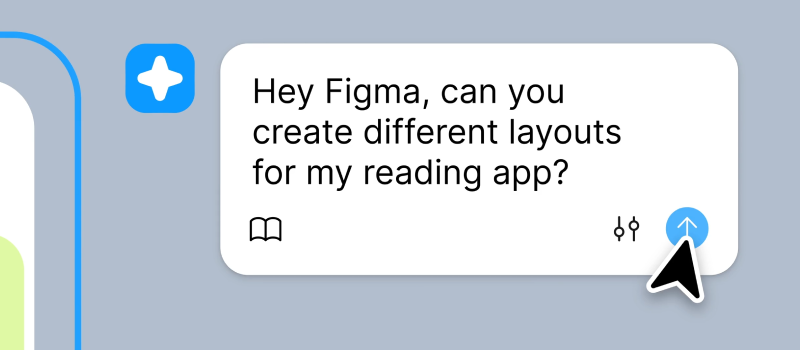
Gemini 3 Pro reads through user research, feature specs, and product analytics to propose user journeys, value propositions, and feature narratives. Nano Banana Pro turns those into storyboards, empty-state illustrations, onboarding visuals, and app-store screenshots that actually look like your final product, complete with accurate UI text.
Content marketing at scale
Have Gemini 3 Pro handle topic clustering, outline long-form pieces, and draft SEO-friendly articles that respect search intent and internal linking strategy. Nano Banana Pro creates consistent blog hero images, inline diagrams, comparison visuals, and social repurposes for each article while maintaining a recognizable visual identity.
Client pitches that land
Gemini 3 Pro takes your raw project inputs (Slack threads, Figma comments, analytics screenshots) and structures them into case studies and proposal decks. Nano Banana Pro generates polished mockups, before/after visuals, and conceptual diagrams that sell the story without you spending hours in design software.
How to Build This Into Your Process
Instead of thinking about these as "AI tools you sometimes open," treat them more like infrastructure you build on.
Create reusable prompt systems. One set for "research + brief + outline" with Gemini 3 Pro. Another for "visual spec to image variations to refinements" with Nano Banana Pro. Save these as templates in your stack, whether that's internal docs, automation tools, or your AI workspace.
Standardize what you feed in. Always start with brand guidelines, voice rules, and design tokens so the model has a clear reference point. Use a consistent structure like "Goal, Audience, Constraints, Examples, Deliverables." This makes outputs way more predictable and easier to refine.
Automate the boring parts. Even with simple automation (like n8n or API flows), you can chain everything together: brief intake flows to Gemini 3 Pro planning, to draft content, to Nano Banana Pro images, to final packaging in Notion, Google Docs, or Figma for review. Add a light human quality check at the end rather than manually starting every step.
This is where the real leverage happens. Not just better prompts, but a repeatable pipeline you could even sell as a productized service.
Thinking About Pricing and Plans
Since Nano Banana Pro access is tied to Gemini 3 tiers, your subscription actually shapes your production capacity.
For lighter work: A Pro-tier setup usually gives you enough daily 4K generations for typical client projects like social content, landing pages, and pitch decks.
For heavy production: If you're cranking out hundreds of 4K images daily (think performance marketing, large e-commerce catalogs, or template businesses), it might make sense to step up to a higher tier or mix in other image providers as backup.
Stay intentional with usage. Work in batches, be explicit about resolution needs, and avoid "prompt gambling" where you just keep regenerating hoping for magic. Treat each generation like a deliberate design iteration.
This framing also helps when talking to clients. They're not paying for "some AI clicks." They're paying for a tuned, reliable production pipeline that delivers consistent results.